HTMX Hypermedia Returns: The Old/New Architecture of the Web

Introduction
Modern web development requires shipping megabytes of JavaScript , managing duplicated state, and wiring complex client-side routing . Framework fatigue stems from treating the browser as a thick client instead of a hypermedia engine.
Shifting state management and rendering back to the server enables dynamic interfaces without the operational overhead of heavy single-page applications .
This guide evaluates the production-ready HTMX 1.x and 2.x tracks. Bounding our architectural scope to verifiable, production-ready realities prevents architectural scope creep and speculative futures.
We will analyse three core components of this architecture:
- Data Delivery : The mechanical differences between traditional JSON APIs and HTML fragment delivery.
- State Transitions : The implementation requirements for declarative state modifications.
- Enterprise Integration : The strategic trade-offs of integrating this approach into an ecosystem like Optimizely.
By the end, you will have a clear matrix for deciding when to bypass heavy UI frameworks and simplify your stack.
1. The Core Philosophy: Hypermedia on Tomatoes
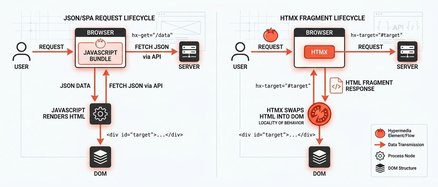
In conventional Single Page Application (SPA) paradigms, the browser functions as an execution shell that downloads extensive JavaScript bundles ( React , Angular , Vue ) to handle client-side rendering . The client requests JSON via APIs, and client-side JavaScript transforms that data into HTML elements.
HTMX reverts web architecture to its origins through three sequential mechanisms:
- Request Execution : The client issues an HTTP request , and the server responds directly with raw HTML fragments.
- DOM Integration : The library intercepts this response and swaps the new HTML into the active DOM .
- State Standardisation : This process executes the REST / HATEOAS design defined in Roy Fielding's Dissertation .
Removing client-side state synchronisation preserves the server database as the singular source of truth.
2. How HTMX Works (By Example)
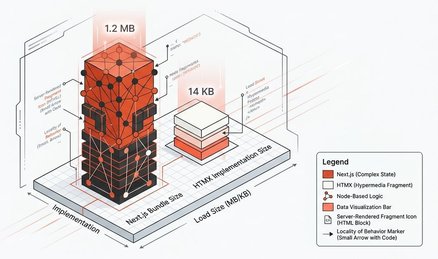
HTMX replaces custom event listeners and fetch requests with declarative HTML attributes . Operating on a dependency-free footprint of ~14KB gzipped (detailed by htmx - high power tools for HTML ), it orchestrates complex interactions natively.
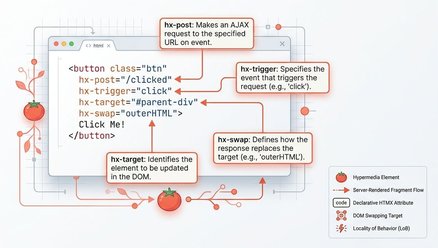
Consider the implementation of a dynamic POST request :
Results will appear here...The system evaluates four specific declarative attributes during execution:
- hx-post: Dispatches an AJAX POST request directly to the backend.
- hx-trigger: Dictates the event that fires the request.
- hx-target: Locates the specific DOM element to update.
- hx-swap: Overwrites the target element with the server's HTML response.
Progressive enhancement operates via the hx-boost="true" attribute. This converts standard links and forms within a parent element into AJAX requests, allowing a site navigation layout to function as a highly dynamic single-page shell without full browser reloads.
3. Why Developers Choose HTMX
HTMX processes standard HTML fragments, making the library completely backend-agnostic. It integrates natively with .NET/C# , Django , Ruby on Rails , or Go templates .
The architecture executes on the Locality of Behaviour (LoB) principle. An element's behaviour is declared directly on the tag itself, reducing cognitive load.
Every HTMX request includes an HX-Request: true header. Detecting this header in server-side environments allows controllers to dynamically branch response logic.
This integration offers two primary performance benefits:
- Logic Branching : The Htmx.Net ASP.NET Core Library simplifies request detection via Request.IsHtmx() extensions.
- Metric Optimisation : Reducing client-side JavaScript improves Core Web Vitals , as explored in The Need for Speed: Velocity Hacks for Web Development and Experimentation .
4. When Not to Use It
HTMX depends heavily on network round-trip times. Applications requiring sub-second, highly interactive local UI updates (e.g., drawing canvases , real-time multiplayer games) require alternative architectures.
This model presents strict operational limitations across two specific scenarios:
- Network Availability : The library cannot support offline-first capabilities.
- State Complexity : Debugging state transitions managed through markup attributes becomes complex in large-scale applications with hundreds of overlapping elements.
For extensive client-side rendering requirements, established headless architectures remain superior. This architectural divergence is documented in How I Built a Modern Web App: Learning Next.js & Headless CMS Approach .
5. HTMX & Optimizely — Where It Fits (and Where It Doesn't)
Within the Optimizely CMS ecosystem, HTMX integrates into the ASP.NET Core In-Process MVC rendering path. Traditional pipelines function as ideal hosts for returning HTML fragments, detailed in Rendering in Optimizely CMS 13 .
Targeting standard controller actions with hx-get returns a Razor partial view (PartialView()). This configuration makes components like lazy-loaded grids and faceted searches highly performant.
Developers must restrict HTMX to the application shell and avoid targeting Optimizely Visual Builder experiences (Grid, Row, Column, Section) due to three critical systemic conflicts:
- Pipeline Interference : Dynamic DOM swaps on Visual Builder elements conflict directly with the platform's structured composition pipelines.
- Hydration Failure : Internal hydration layers depend on Optimizely's React-based UI overlays and proprietary Episerver DOM-diffing routines utilised during on-page editing.
- Lifecycle Severance : Forcing an HTML fragment swap on these nodes destroys the React virtual DOM synchronisation and breaks the editor's lifecycle hooks.

6. Browser Compatibility & Security: Is HTMX Production-Ready?
HTMX provides production-ready support across Chrome, Safari, Firefox, and Edge. The modern 2.x track drops support for legacy Internet Explorer entirely.
The release of version 2.0 implemented two major architectural modifications:
- Protocol Separation : Core WebSocket and Server-Sent Events (SSE) support were removed and separated into modular extensions.
- Binding Adjustments : hx-delete passes parameters as query strings to align with HTTP specifications, breaking ASP.NET Core [FromBody] bindings.
Because HTMX dynamically injects HTML directly into the DOM, strict Content Security Policies (CSP) frequently conflict with inline scripts.
Surviving rigid Cloudflare Web Application Firewall (WAF) block rules requires strict mitigation through two primary methods:
- Configuration : Explicitly configure the htmx.config.inlineScriptNonce variable.
- Extension Deployment : Deploy the official HTMX CSP extension.
Implementing the official HTMX CSP Configuration Guidelines ensures secure nonce management and maintains application integrity.
Conclusion & Strategic Advice
HTMX offers a clear architectural solution to SPA framework bloat. When projects depend on CRUD operations , search interfaces, or data dashboards, exchanging HTML fragments reduces the technical complexity budget.
For highly interactive or offline systems, client-side frameworks remain the optimal path. Teams should initiate adoption by auditing legacy server-rendered templates and enhancing critical touchpoints with hx-boost or modular AJAX swaps.
To explore the conceptual foundation of this architecture, proceed to the next module in this series: Locality of Behaviour (LoB): Clean Code in HTML Templates. Evaluating hypermedia implementation proves that eliminating build-time configurations accelerates shipping velocity.
Further Reading
More From Me
Original Article: Read on LinkedIn | Read on Substack