Optimizely Media Delivery: from GDI+, ImageSharp, to DXP
Introduction
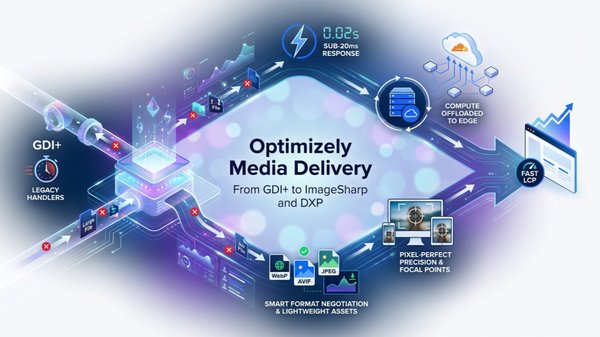
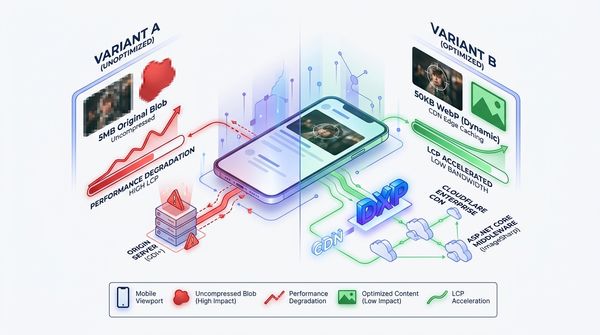
Uncompressed hero images act as a primary bottleneck in web performance. The default workflow degrades Largest Contentful Paint (LCP) and consumes excessive CDN bandwidth through two specific mechanisms:
- Editorial overhead : Users routinely upload raw 5MB binaries into Optimizely media folders.
- Payload inflation : The system pushes massive desktop assets directly to mobile viewports.
Solving this requires an automated image transformation pipeline to deliver responsive assets on demand. Transitioning from legacy .NET architectures relies on three primary integrations:
- Framework migration : Moving to modern ASP.NET Core middleware .
- Compute offloading : Deploying Cloudflare infrastructure for edge-level transformations.
- Payload reduction : Implementing these strategies across self-hosted and Optimizely DXP environments to reduce mobile payloads by up to 80% while retaining editorial control.
Understanding this pipeline requires bypassing standard static file handler limitations. This involves implementing SIMD -accelerated origin resizing and leveraging CDN edge workers for infinite scalability.
1. The Hero Image Performance Trap
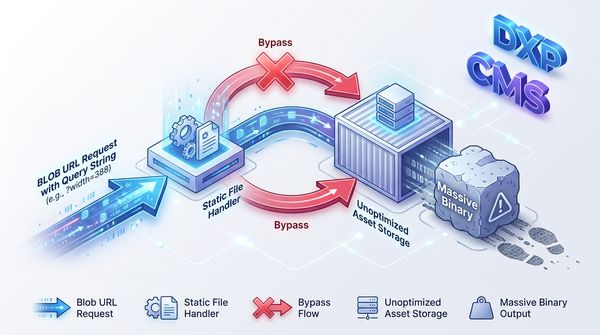
Standard ASP.NET Core static file handlers serve media binaries byte-for-byte. Appending sizing parameters in Razor views ignores the query string unless dedicated middleware intercepts the request. The absence of middleware causes two critical failures:
- Bandwidth saturation : The original massive binary streams directly to mobile devices, driving up network costs.
- Performance degradation : High bounce rates correlate with these slow transfers, as documented in the Optimizely Performance Guidelines.
Adding dynamic resizing guarantees sub-20ms cached response times and protects Frontend performance.
2. Architectural Evolution & Environment Framing (DXP vs Non-DXP)
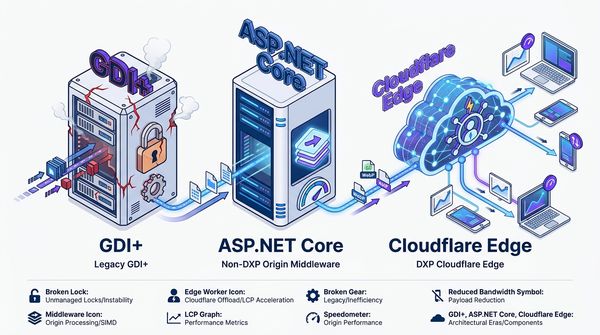
Image processing in Optimizely operates across three distinct architectural eras:
- Era 1 (Legacy EPiServer 7-11) : Relied on unmanaged GDI+ , HttpModules, and ImageResizer.Plugins.EPiServerBlobReader. Unmanaged memory allocation caused IIS worker process crashes under traffic spikes.
- Era 2 (Modern Non-DXP / Self-Hosted CMS 12/13) : Built on ASP.NET Core middleware (Baaijte.Optimizely.ImageSharp.Web). Runs on origin servers using SIMD acceleration and zero-allocation memory buffers, requiring custom CDN cache-key rules for query strings.
- Era 3 (Edge-Native DXP) : Utilises Optimizely DXP's built-in Cloudflare CDN. Provides origin middleware with automatic edge caching, or direct edge transformations via Cloudflare Workers.
3. Why Query Strings (?width=388) Silently Fail Without Middleware
ASP.NET Core static file middleware matches request paths directly to disk locations, ignoring query string parameters. A request for /blobs/hero.jpg?width=388 bypasses processing to return the unoptimised asset byte-for-byte. Resolving this constraint requires dedicated middleware to execute three pipeline interventions:
- Parameter parsing : Intercepting the request pipeline before static file handling occurs to read the query strings.
- Memory execution : Resizing the image directly in memory.
- Data streaming : Returning the lightweight binary to the client.
4. Installing & Registering Baaijte.Optimizely.ImageSharp.Web
Origin resizing in Optimizely CMS 12/13 requires installing the Baaijte.Optimizely.ImageSharp.Web package. Execution relies on calling services.AddBaaijteOptimizelyImageSharp() within the ConfigureServices method.
Note: This package depends on SixLabors.ImageSharp, mandating a commercial license for specific enterprise deployment tiers. Development teams must audit their licensing compliance before deployment.
Middleware ordering determines pipeline success and prevents silent failures. The app.UseBaaijteOptimizelyImageSharp() declaration must physically precede two standard components:
- Static file handling : Executing before native disk mapping.
- Routing declarations : Triggering before application routing paths in the startup sequence.
// Startup.cs snippet
app.UseBaaijteOptimizelyImageSharp();
app.UseStaticFiles();
app.UseRouting();
Visual Suggestion : C# code snippet for services.AddBaaijteOptimizelyImageSharp() and app.UseBaaijteOptimizelyImageSharp().
5. Origin Middleware vs Cloudflare Edge Transformations (/cdn-cgi/image/)
Optimizely DXP supports two distinct execution paths. The first strategy utilises origin middleware combined with CDN caching to enforce two response behaviours:
- Header injection : Attaching strict, immutable cache headers to the response payload.
- Permanent caching : Instructing the Cloudflare CDN to cache the transformed variation permanently.
Native Cloudflare edge resizing relies on a specific URL syntax (/cdn-cgi/image/). Documented in the Cloudflare Image Resizing Docs , this method offloads 100% of rendering computation to edge workers to bypass the origin server entirely.
This infrastructure architecture necessitates a dual-strategy for deployment:
- Local environments : Relying on the origin middleware fallback, as Cloudflare edge URLs cannot execute against local blob storage.
- Production environments : Shifting exclusively to edge workers for total compute offloading within Optimizely DXP.
Visual Suggestion : Sequence diagram comparing Query String Origin Middleware + Cloudflare Edge Caching vs Direct Cloudflare Edge Image Resizing.
6. Building Responsive Tag Helpers & WebP/AVIF Negotiation
Custom Razor Tag Helpers handle environment-aware routing dynamically to bridge the execution gap between local development and edge deployment. These helpers construct URLs programmatically based on the active environment context.
The helper executes two distinct logic paths based on the hosting infrastructure:
- Local execution : Using standard query strings (e.g., ?width=388&format=webp) to trigger the origin ImageSharp middleware.
- Production execution : Rewriting the output in DXP environments to map parameters into Cloudflare's path segment syntax (/cdn-cgi/image/width=388,format=webp/).
This conditional routing constructs edge-native URLs securely. Format negotiation automatically serves modern formats like AVIF or WebP , falling back to standard JPEGs for legacy browser support. The output renders semantic markup mapped with native lazy loading and asynchronous decoding attributes.
<!-- Local Development Output (Query String Mapping) -->
<img src="/contentassets/hero.jpg?width=388&mode=crop&format=webp" loading="lazy" decoding="async" />

<!-- DXP Edge Production Output (Path Segment Mapping) -->
<img src="/cdn-cgi/image/width=388,fit=crop,format=webp/contentassets/hero.jpg" loading="lazy" decoding="async" />
7. Focal Point Metadata & Authoring UX
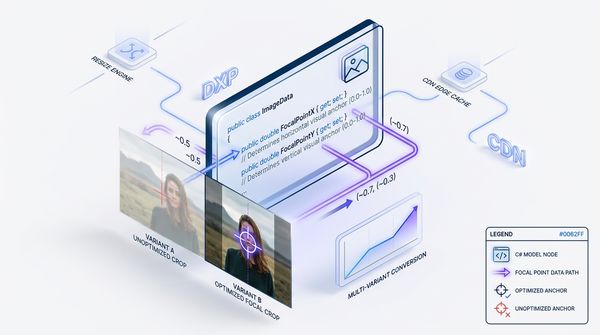
Automated centre cropping frequently misaligns portrait photos when transforming aspect ratios . Maintaining exact image focus across viewports requires extending the standard ImageData model through two coordinate parameters:
- X-Axis definition : Implementing a FocalPointX property to determine the horizontal visual anchor.
- Y-Axis definition : Implementing a FocalPointY property to determine the vertical visual anchor.
The resizing middleware consumes these coordinate percentages to anchor crop boxes precisely, preserving editorial intent across device breakpoints.
8. Implementation Checklist for Developers
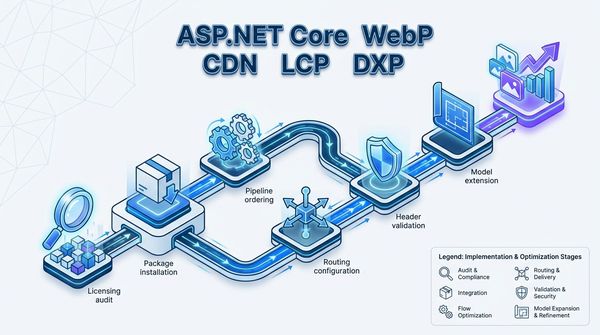
Securing a compliant and performant image pipeline requires developers to execute six mandatory implementation steps:
- Licensing audit : Verify SixLabors.ImageSharp compliance for enterprise deployment tiers.
- Package installation : Ensure Baaijte.Optimizely.ImageSharp.Web is installed for CMS 12/13 origin fallback.
- Pipeline ordering : Verify the middleware declaration precedes static files in the request pipeline.
- Routing configuration : Implement environment-aware Tag Helpers to swap between origin query strings and edge path segments.
- Header validation : Audit CDN response headers for immutable edge caching.
- Model extension : Extend ImageData models with focal point parameters.
Conclusion & Strategic Advice
The transition from legacy GDI+ modules to ASP.NET Core middleware and edge-native Cloudflare processing dictates the modern standard for media delivery in Optimizely CMS. Executing automated pipelines with native AVIF and WebP format negotiation achieves payload byte size reductions of 65% to 80% with zero perceptible visual degradation, yielding massive LCP improvements for Frontend performance.
Deploying this architecture requires aligning your caching strategy directly with your hosting environment:
- Self-hosted deployments : Using Baaijte.Optimizely.ImageSharp.Web as a zero-allocation solution for non-DXP environments, provided custom CDN query string caching is configured.
- Managed infrastructure : Offloading computation entirely to Cloudflare via /cdn-cgi/image/ for optimal execution in DXP environments.
- Hybrid orchestration : Maintaining robust origin middleware as a fallback for local development and non-DXP nodes, while dynamically routing production traffic through distributed edge computation for infinite scalability.
What routing strategy governs your media architecture—origin middleware or edge caching?
💬 What routing strategy governs your Optimizely media architecture—origin middleware or edge caching? Share your setup below and ♻️ share this post to save your network from bandwidth saturation!
Further Reading
- Smashing Magazine: WebP and AVIF Image v Guidelines
- Dev.to: ImageSharp Implementation in ASP.NET Core
- Cloudflare Official Blog: Image Resizing at the Edge
More From Me
Original Article: Read on LinkedIn | Read on Substack