Optimizely Forms: Custom Actors & Event Pipelines
Introduction
The conventional operational model for digital experience platforms isolates form submissions into tightly bounded, asynchronous execution loops. Entries clear validation, write directly to local databases, and rest inertly until administrators request batch CSV exports.
This deferred administrative layer introduces three core architectural vulnerabilities:
- Data Retention Risks : Retaining isolated records on the local server inflates compliance liabilities.
- Attribution Obscurity : Delayed ingestion breaks real-time multi-channel tracking.
- Synchronisation Delays : Batch processing blocks automated external system routing architectures.
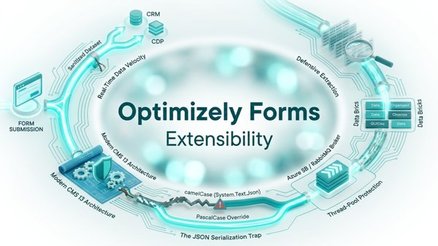
Extending the native execution pipeline allows a custom event actor to intercept payloads at the exact moment of validation and route sanitised datasets to downstream customer data platforms or CRM endpoints. This blueprint outlines the architectural implementation of custom post-submission actors in Optimizely Forms across four technical migration requirements:
- Service Registration : Managing the shift to explicit dependency injection in CMS 13.
- Search Modernisation : Addressing the deprecation of legacy EPiServer.Find dependencies in favour of Optimizely Graph.
- Payload Formatting : Resolving dangerous serialisation -breaking changes.
- Resource Allocation : Enforcing strict thread constraints during the actor lifecycle.
The Form Data Silo Problem
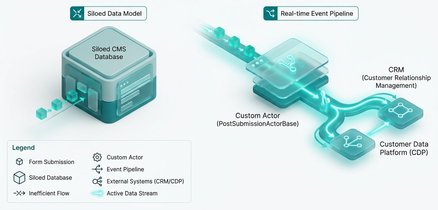
Treating digital capture points as closed ecosystems breaks data velocity and bottlenecks the lead ingestion cycle. Extending the native execution pipeline guarantees automated, real-time dataset routing directly to secondary systems.
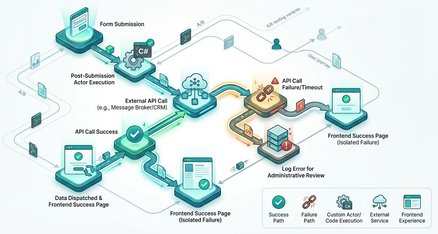
The custom actor executes two immediate operations upon payload validation:
- Extraction : It captures the validated dataset directly from the pipeline context Optimizely Forms - CMS 12 .
- Transmission : It routes the structured payload to downstream infrastructure.
NuGet Setup & Dependency Injection Configuration
Constructing a custom programmatic pipeline requires adding the core package to the local project space.
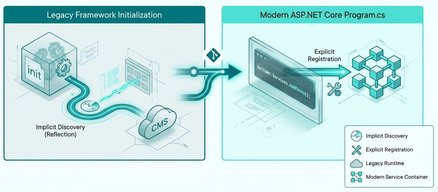
dotnet add package EPiServer.FormsDependency injection configuration shifts significantly between platform versions. Modern .NET 10 (CMS 13) iterations disable automatic runtime reflection hooks for the base forms subsystem, enforcing two distinct registration rules:
- Explicit Subsystem Registration : You must register the forms subsystem inside the initialisation sequence using builder.Services.AddForms() Breaking changes in Optimizely Forms 6.0.0 .
- Implicit Actor Discovery : The CMS runtime continues to use assembly reflection at startup to discover classes inheriting from PostSubmissionActorBase, rendering manual container mapping unnecessary.
Thread-Blocking Constraints & Event Decoupling
Custom payload processing requires a class inheriting directly from PostSubmissionActorBase. The execution lifecycle is anchored to the strictly synchronous Run() method, which fires after multi-step sequences have cleared validation, providing a clean interception layer for Optimizely Forms - CMS 12 .
Embedding asynchronous cloud endpoints via . GetAwaiter().GetResult() prevents contextual deadlocks in ASP.NET Core but rapidly consumes thread-pool threads at high concurrency. Mitigating this synchronous blockage requires an event-driven architecture using three alternative dispatch targets:
- In-Memory Queues : Dispatching payloads via [IHostedService](https://learn.microsoft.com/en-us/dotnet/api/microsoft.extensions.hosting.ihostedservice).
- Cloud Message Brokers : Routing data to Azure Service Bus .
- Dedicated Message Queues : Publishing events to RabbitMQ .
The CMS 13 Serialisation Trap
Upgrading to CMS 13 introduces a destructive platform shift in JSON processing that can cause data loss if unmanaged. The framework transitions serialization from [Newtonsoft.Json](https://www.newtonsoft.com/json) to native [System.Text.Json](https://learn.microsoft.com/en-us/dotnet/api/system.text.json), defaulting to [camelCase](https://en.wikipedia.org/wiki/Camel_case) serialization.
Routing datasets to downstream CRM platforms without explicit serialisation handling causes external APIs to fail or silently reject payloads. Ensuring schema compliance requires configuring JsonSerializerOptions through two specific adjustments:
- Casing Overrides : Modifying the property naming policy to enforce standard casing rules (often PascalCase ).
- Payload Validation : Verifying that the serialised output structure matches strict CRM ingestion schemas before transmission.
Unified Implementation: Safe Extraction & Dispatch
Extracting captured form entries requires navigating the inherent brittleness of the SubmissionData.Data collection. Key indexes resolve to internal GUID -like model identifiers (e.g., __field_123) rather than friendly labels Forms - CMS 13 .
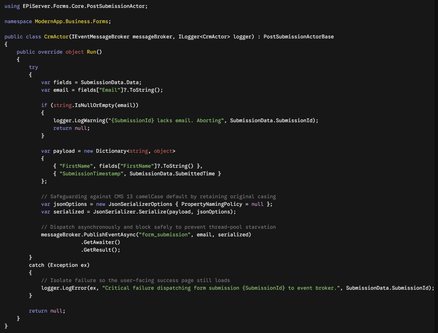
The production-ready script below demonstrates a cohesive implementation of PostSubmissionActorBase that protects the frontend thread through three operational layers:
- Dictionary Extraction : Applying strict null-checking to extract values from opaque field keys.
- Serialisation Management : Overriding default JSON formatting to meet external schema requirements.
- Robust Dispatch : Employing an event-driven message broker to isolate errors and bypass synchronous constraints.
Error Handling & Failure Recovery Strategies
Network volatility demands the decoupling of internal platform stability from external API uptime dependencies. The end-user form flow must continue operating even when a message broker becomes unreachable or an external CRM ingestion gateway times out.
The unified implementation script deploys an isolated try-catch block to contain external outages through two recovery mechanisms:
- Administrative Auditing : Logging exceptions precisely to flag the payload failure for administrative review.
- Frontend Continuity : Returning the actor gracefully so the frontend displays standard success messages without interruption.
Conclusion & Strategic Advice
Automating the transition of data from isolated CMS databases into dynamic downstream pipelines resolves operational latency and multi-channel tracking limitations. Overriding PostSubmissionActorBase grants engineering teams programmatic authority over the final execution sequence.
To survive the migration to CMS 13, you must follow the updated dependency frameworks and payload formatting rules. A successful modern deployment relies on executing three critical architectural checks:
- Thread Management : Decoupling synchronous thread handlers using event-driven architecture.
- Data Integrity : Explicitly overriding the System.Text.Json serialisation defaults to match CRM schemas.
- Field Validation : Verifying extraction safety nets to manage the structural brittleness of form field keys.
Review your active integration pipelines and test these constraints locally before initiating your environment migration.
💬 How are you currently managing form submissions and CRM syncing in your modern DXP architecture? Share your approach below and ♻️ share this post to help developers migrating to CMS 13!
Further Reading
- Optimizely Forms Core Documentation Hub : Reference materials for fundamental forms deployment.
- Optimizely Forms for CMS 13 Platform Developer Guide : Engineering specifications for the v13 update.
- Breaking Changes in Optimizely Forms 6.0.0 : The detailed index of API shifts and dependency modifications.
More From Me
- Upgrading Optimizely: CMS 11 to 13 Stepwise Guide : A technical framework for version migration.
- Navigating Optimizely: ODP Modern Customer Data Platform 🌐 : Integration patterns for customer data platforms.
- Mastering Optimizely's Headless CMS: Unlocking Optimizely with Frontend Frameworks : Deploying decoupled frontend architectures.
- Future-Proofing Optimizely: Unlocking Optimizely with Frontend Frameworks : Strategies for sustainable framework adoption.
Original Article: Read on LinkedIn | Read on Substack