Lighthouse Part 3: Accessible Web Engineering
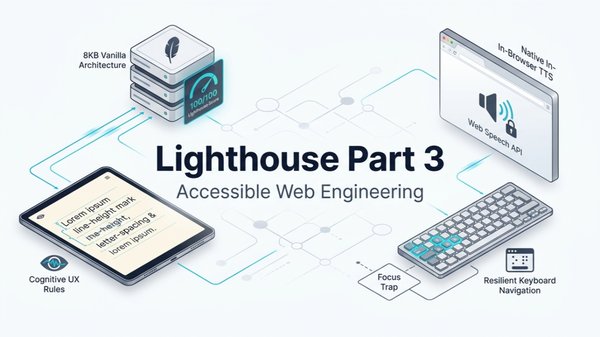
- Part 3 of 4 - In-Browser Text-to-Speech & Dyslexia Engines
Introduction
Building upon the layout stability principles explored in Lighthouse Part 2: CLS & Layout Stability , this piece details the engineering mechanisms required to construct a zero-dependency accessibility suite natively within the browser environment. Digital inclusion routinely devolves into an afterthought, outsourced to third-party overlay scripts that introduce prohibitive latency, security risks, and severe layout shifts.
When constructing a true lightweight architecture, developers must apply rigorous defensive programming to account for three critical browser inconsistencies:
- JavaScript Foundation : Utilising lightweight vanilla JavaScript and native web APIs delivers a comprehensive suite within an 8KB footprint.
- API Fragmentation : The Web Speech API exhibits cross-platform fragmentation, asynchronous voice loading (onvoiceschanged), and character-limit utterance dropping in browsers like Chrome.
- Screen Reader Limitations : Naive implementations of aria-live trigger screen reader suppression during heavy single-page application (SPA) mutations.
We mitigate these failure points by integrating feature detection and state debouncing as fundamental architectural requirements. The detailed implementations below help technical teams meet human-centric cognitive design demands and stringent compliance mandates while securing a 100/100 Lighthouse Performance rating .
Prerequisites & Context
- Foundational Knowledge : Familiarity with browser APIs, DOM manipulation , defensive programming, and CSS variable scope.
Target Audience & Keywords
- Primary Audience : Technical Strategy & Design Implementers - Focus on user-centric design, interaction patterns, inclusive product engineering, and cutting-edge API integration.
- Secondary Audience : Governance & Standards Leadership - Managing global digital accessibility standards, framework mandates, and platform compliance.
- Keywords : Web Accessibility, a11y , Dyslexia Typography, Web Speech API, ARIA Live Regions, Contrast Profiles, Keyboard Navigation & Focus Traps .
1. The Performance vs Accessibility Dilemma
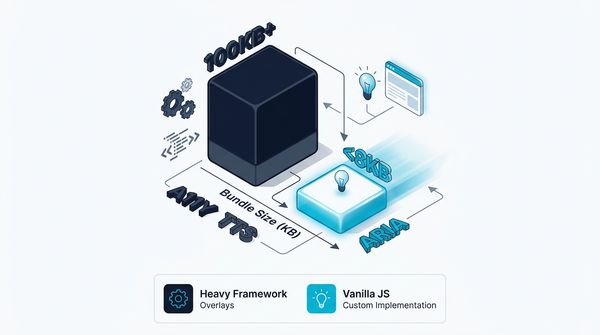
Injecting accessibility utilities into heavy UI frameworks like React or Vue rapidly inflates client bundles. This bloat directly penalises users by extending the time-to-interactive .
A vanilla JavaScript approach bypasses framework overhead completely through two core mechanics:
- State Management : Using browser-native APIs and CSS Custom Properties - MDN handles UI states without external dependencies.
- Instantaneous Overrides : Contrast profiles, including High Contrast and Warm Ivory, toggle directly at the :root level.
Eliminating JavaScript restyling computations keeps the total footprint under 8KB. This structural efficiency matches commercial overlay feature sets while preserving high performance metrics.
2. Dyslexia Typography & Cognitive UX Rules
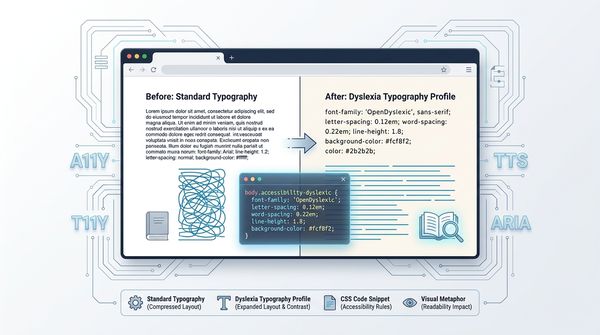
Individuals processing text through the lens of dyslexia frequently encounter character crowding and visual parsing fatigue. The accessibility controller programmatically injects specific layout rules to resolve these cognitive barriers.
Serving specialised web fonts like OpenDyslexic introduces heavy payloads that violate the 8KB limit. A resilient dyslexia architecture relies on system-installed fonts alongside four structural adjustments:
- Line Heights : Expanding the height (line-height: 1.8) to reduce vertical crowding.
- Letter Spacing : Increasing spacing (letter-spacing: 0.12em) to separate characters clearly.
- Word Gaps : Widening the gaps (word-spacing: 0.22em) to isolate individual terms.
- Background Colour : Defaulting to a warm ivory (#fcf8f2) to eliminate the glare of pure white screens.
These adjustments specifically correct line-tracking errors and visual fatigue generated by high-contrast environments.
/* Dyslexia Typography Profile */
body.accessibility-dyslexic {
  /* Relies on system-installed fonts to avoid payload bloat */
  font-family: 'OpenDyslexic', 'Comic Sans MS', sans-serif;

  /* The true structural heavy-lifters: */
  letter-spacing: 0.12em;
  word-spacing: 0.22em;
  line-height: 1.8;

  background-color: #fcf8f2;
  color: #2b2b2b;
}
Applying this profile via a top-level CSS class executes seamless transitions without triggering a page reload. This technique locks the user's scroll state and exact reading position.
3. In-Browser Text-to-Speech (TTS) Engine
External server-side audio generation introduces unacceptable latency and privacy vulnerabilities. Native TTS executes locally via the window.speechSynthesis interface SpeechSynthesis - MDN derived from the Web Speech API - MDN .
Operating system fragmentation and mobile WebView inconsistencies require explicit feature detection and graceful degradation handled through three operational steps:
- Conditional Rendering : The system verifies if ('speechSynthesis' in window) before injecting the TTS UI controls into the DOM .
- Asynchronous Binding : Engineers must bind to the speechSynthesis.onVoicesChanged event before initiating playback to accommodate asynchronous voice array loading.
- Payload Chunking : Explicitly slicing text payloads into smaller, paragraph-level utterances prevents cross-platform failure states, such as Chrome's character-limit utterance dropping.
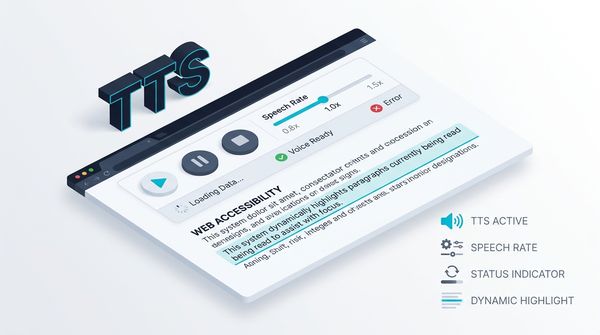
By modifying the SpeechSynthesisUtterance.rate - MDN property, the engine shifts playback speed from 0.8x to 1.5x on demand.
The browser coordinates text parsing with a dynamic .reading-highlight class tied to the active utterance boundary, ensuring visual context tracking. This defensive architecture eliminates third-party dependencies, retaining robust utterance queuing, pause/resume logic, and fail-safes for unsupported environments.
4. Keyboard Navigation & Assistive Structure
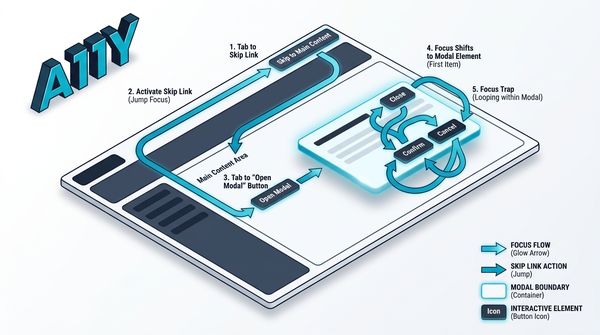
A structurally sound document object model requires strict adherence to WCAG 2.1 AA mandates . Establishing a skip link Skip Navigation Links - WebAIM (.skip-link) as the first focusable node enables users to bypass dense headers, satisfying bypass block requirements WCAG 2.4.1 Bypass Blocks .
Complex applications demand rigid control over keyboard flow through two distinct DOM management patterns:
- Focus Traps : An aria-modal attribute pattern ARIA aria-modal - MDN encapsulates focus within active dialogues, preventing keyboard tabs from leaking into obfuscated background layers.
- Live Regions : A polite live region applies ARIA live attributes ARIA Live Regions - MDN to broadcast asynchronous data injections directly to screen readers ARIA aria-live - MDN .
Engineers must debounce DOM injections into these aria-live="polite" regions to maintain announcement integrity. Overwhelming the DOM during heavy state mutations in modern Single Page Applications (SPAs) causes screen readers to drop or suppress updates.
Implementing strict state-debouncing elevates this implementation from standard markup instructions into resilient accessibility architecture.
Troubleshooting & FAQ
When engineering accessibility features, development teams must address two critical performance and physical health risks:
- Commercial Overlays : Third-party solutions inject over 100KB of external logic, creating critical layout shifts and potential security vulnerabilities. A custom, native vanilla approach bypasses these performance penalties entirely.
- Motion Sensitivity : Ensure the TTS .reading-highlight animation aligns with the [prefers-reduced-motion](https://developer.mozilla.org/en-US/docs/Web/CSS/@media/prefers-reduced-motion) media query at the OS level to avoid triggering vestibular sensitivity .
Conclusion & Strategic Advice
The convergence of cognitive layout rules, ARIA structural compliance, and native Web Speech APIs confirms that comprehensive web accessibility operates independently of performance degradation.
Engineers should align their technical approach with the primary content format using this three-tier selection matrix:
- Static Content Heavy : Prioritise native typography toggles and structural bypass links.
- Dynamic/Interactive : Emphasise strict focus trapping and debounced aria-live regions for state mutations.
- Long-form Reading : Deploy feature-detected native TTS utilities alongside high-contrast profile overriding.
Adopting a vanilla strategy resolves the bloated payloads generated by commercial overlays. Hardcoding inclusivity into the foundational UI architecture makes digital spaces structurally resilient.
In the next instalment, Lighthouse Part 4: Agentic Browsing & LLMs , we examine the newest frontier of optimisation by evaluating how model context protocols interface natively with these assistive paradigms. Build accessibility cleanly, test relentlessly, and avoid the overlay trap.
💬 How is your engineering team balancing strict WCAG accessibility mandates with aggressive performance budgets? Share your strategy and ♻️ share this post with your network!
Further Reading
Review these standardisations to support your native API implementations:
- W3C Web Accessibility Initiative (WAI): Cognitive Accessibility Guidance
- MDN Web Docs: Web Speech API Implementation
- WebAIM: Designing for Screen Reader Compatibility
More From Me
Explore the technical and strategic methodologies driving modern web inclusivity:
Original Article: Read on LinkedIn | Read on Substack