Optimizely Opal: Personal Skills and Agent Governance
Introduction
Deploying generative AI assistants across enterprise environments frequently encounters a core friction point: global system prompts enforce rigid, generic outputs that fail to reflect complex, individual workflows.
When every user interacts with a model under identical global instructions, specialists repeatedly paste custom formatting guidelines, tone instructions, and output schemas into every chat session. This homogeneity bottleneck prevents power users from achieving peak velocity and fragments productivity.
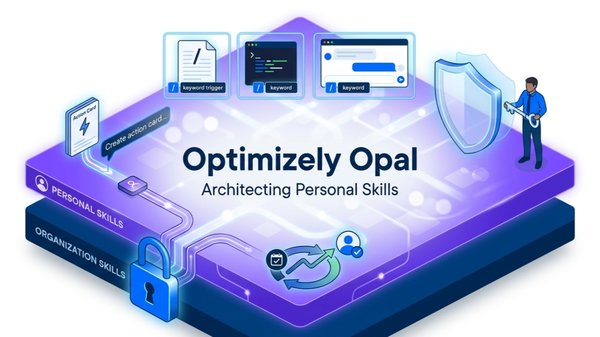
Optimizely Opal decouples individual productivity from tenant-wide compliance through Personal Skills. While Opal supports fully specialised autonomous agents , Personal Skills execute user-scoped prompt and context management to govern local workflows.
By setting this user-level parameterisation, individuals can keep custom system instructions, shortcuts, and operational constraints for their personal account sessions. This guide outlines the configuration paths, scoping parameters, and dual-tier governance needed to tailor the Opal ecosystem while maintaining the organisation's security perimeter.
1. The Homogeneity Bottleneck in Enterprise AI
- User-Level Execution : Personal skills restrict custom AI behaviours exclusively to the individual user without altering tenant-wide organisation baselines.
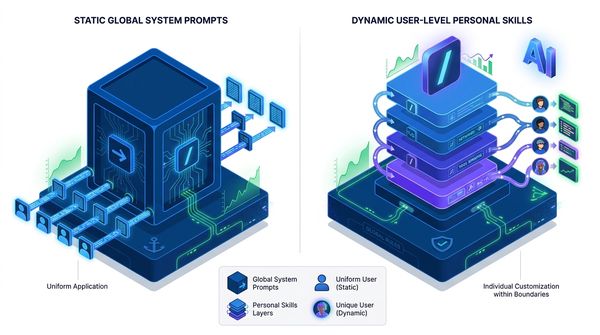
- Instruction Redundancy : When an AI assistant relies solely on static global instructions, it processes every interaction identically. Specialists waste high-value time restating the same constraints, such as strict JSON schema adherence or specific tone limitations, in every new session.
- Workflow Parameterisation : By defining Personal Skills, users inject a secondary instruction layer that applies exclusively to their personal workflows. These skills capture working styles and output preferences to deliver tailored results locally without impacting other team members. Create a personal skill .
2. Access & Context Navigation Matrix
- Ownership Tiering : The Skills console categorises custom instructions by ownership tier, enabling clear management of user-scoped versus organisation-scoped AI behaviours.
- Centralised Management : Configuration follows a predictable administrative path within the Optimizely One application suite, centralising all skill management into a single control plane . Create a personal skill .
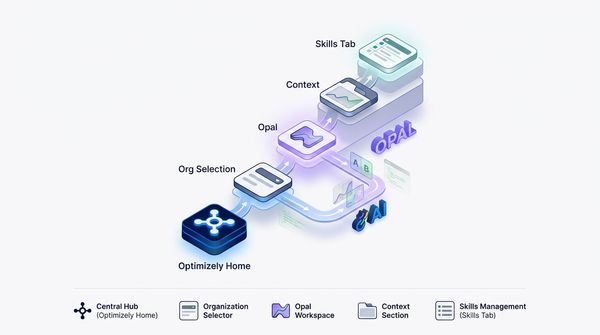
Administrators must complete these four operational steps to access the configuration matrix:
- Authentication : Log in to the central administrative hub at Optimizely Home .
- Tenant Selection : Select the target organisation tenant from the overarching drop-down menu.
- Workspace Activation : Click Opal in the primary navigation header to open the dedicated workspace.
- Console Routing : Navigate to Context > Skills in the left-hand navigation pane.
The resulting console lists all active and inactive skills, displaying the visual boundaries between Personal and Organisation tiers for rapid operational audits.
3. Dual Creation Pathways: Natural Language Action Cards vs Structural Skills Builder
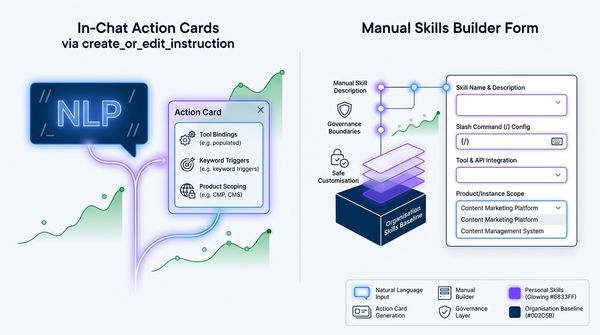
- Inline Generation : Opal Chat supports continuous skill generation via inline Action Cards powered by the active create_or_edit_instruction tool, offering a conversational alternative to manual form entry.
- Deployment Mechanisms : Optimizely provisions two distinct creation pathways to accommodate both rapid prototyping and granular architecture.
Engineers execute skill generation through these two operational pathways:
- Conversational Creation via Action Cards : Users instantiate skills directly during chat interactions using natural-language intents such as "Save this as a skill." Opal evaluates the prompt and generates an inline Create Skill Action Card, pre-populating proposed parameters.
- Tool Configuration Requirements : This zero-context-switch flow requires the create_or_edit_instruction tool to be explicitly configured as Active and Enabled in Chat within the Opal Tool Settings matrix. Manage tools .
- Security & Governance Surface : Enabling this tool allows users to alter the assistant's behavioural instruction stack instantly. Authorising this pathway constitutes a deliberate governance decision that balances rapid prototyping velocity against strict operational control.
- Manual Creation via the Skills Builder : For strict structural control, navigate to Context > Skills and select Add Skill to open the full configuration editor. Create or edit a skill with the skills builder . This deliberate, structural path operates independently of in-chat tool enablement.
4. Scoping Parameters: Shortcuts, Triggers, Tool Bindings, and Product Instances
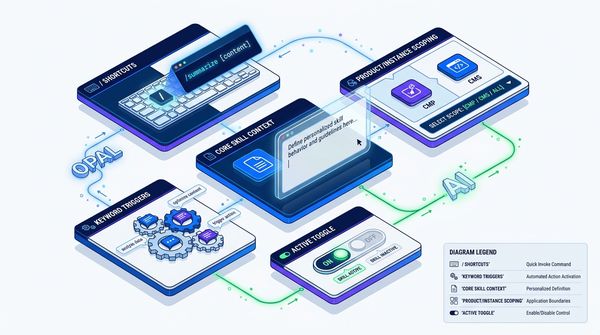
- Execution Constraints : Slash shortcuts (/) enable instant manual invocation, while product and instance scoping prevents personal skill execution outside designated Optimizely One applications.
Defining a skill requires precise configuration of five functional parameters that establish strict operational boundaries:
- Active Toggle : Controls the live execution state, permitting offline drafting before deployment.
- Shortcut ( /): An optional keyword (e.g., /blogformat) typed directly in the prompt line for instant, on-demand invocation.
- When to Use (Triggers) : Keyword intents or specific backend Tool bindings that force the skill to fire automatically during defined execution pipelines .
- Core Context & Add File : The primary instructions and attached reference schemas (PPTX/DOCX/JSON) that ground the model's output in factual, structural reality.
- Where to Use (Scoping) : Binds the behaviour to specific applications, such as CMP or CMS , and instances. This restriction guarantees that a CMS-formatting skill cannot trigger inside a data platform.
5. Personal vs Organisational Skills: Governance Hierarchy and Coexistence
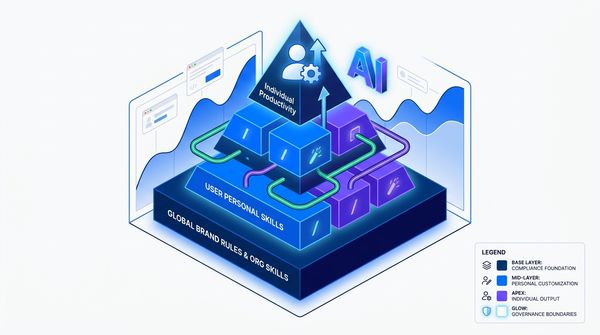
- Compliance Foundations : Organisation Skills establish the compliance floor, while Personal Skills allow for customisation strictly within those foundational boundaries.
- Architectural Boundaries : Enterprise architecture demands a rigid boundary between local productivity deployments and global operational controls. Optimizely enforces this via a strict two-tier hierarchy. Skills overview .
Administrators must govern this two-tier model by managing the following four architectural constraints:
- Baseline Injection : Organisation Skills, authored exclusively by administrators, establish the tenant-wide non-negotiable baseline for brand guidelines, regulatory disclaimers, and data compliance checks. During context payload assembly, the Large Language Model processes Organisation Skills as foundational system messages, while appending Personal Skills downstream.
- Model-Level Compliance : UI-level separations do not mathematically guarantee model-level compliance. Without deterministic pre-processing guardrails, sophisticated user-level prompt injections via Personal Skills could theoretically attempt to "jailbreak" the organisational baseline. Enterprise administrators must actively monitor prompt logs and output audits to enforce this compliance floor.
- Agent Execution Constraints : Specialised, multi-step agents execute exclusively via Organisation Skills. Standalone agents require deterministic, auditable multi-step execution graphs and cannot tolerate the unpredictable prompt variance introduced by user-level instructions.
- Global Overrides : Global administrators utilising Opti ID retain a master override to disable generative AI entirely across the platform, preempting all local configurations. Turn generative AI off across Optimizely applications .
Conclusion & Strategic Advice
Personal Skills transform Opal from a generalised assistant into a highly parameterised interface tailored to user-specific operational pipelines. By combining conversational Action Cards with granular product scoping and shortcut triggers, individuals can achieve significant velocity gains while staying within the tenant's security architecture.
When establishing an AI orchestration strategy, use Organisation Skills to anchor compliance baselines so that power users can abstract repetitive tasks into user-scoped behaviours. For cross-instance scale, utilise the export and import functionality for personal skills via JSON or SKILL.md formats , Import and export skills .
Architecting this separation of concerns is fundamental to mastering hybrid intelligence in modern digital experience pipelines.
💬 How is your engineering team balancing infrastructure resilience with operational marketing agility? Share your insights below and ♻️ repost to discuss with your network!
Further Reading
- Anthropic: Organising and Structuring System Prompts
- Microsoft Azure: Enterprise Generative AI Security & Governance Frameworks
- NIST: Artificial Intelligence Risk Management Framework (AI RMF)
More From Me
Original Article: Read on LinkedIn | Read on Substack